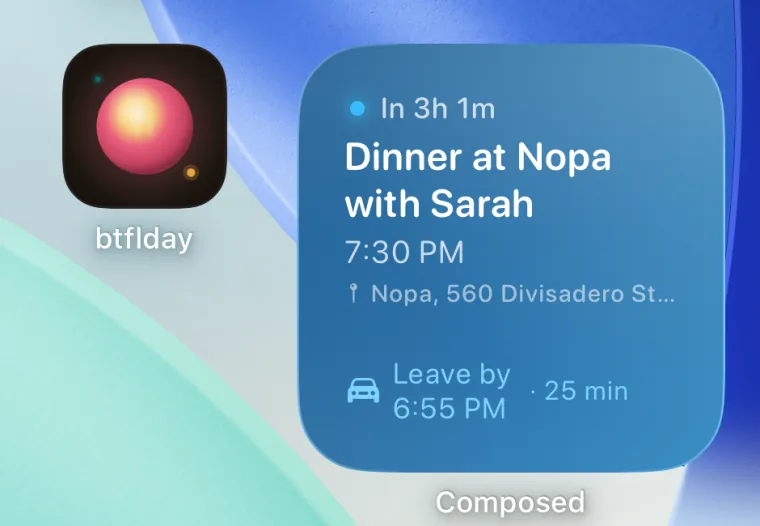
A single alert assumes you will act the moment it arrives. Composed, an AI calendar for iPhone, spreads reminders out instead: a quiet heads-up more than a week away, a nudge in the week before tied to the prep, and the reminders on the day, which are time-sensitive and can come through a Focus if you allow it. One alert is easy to swipe away; a few, spaced to the plan, are not.
This is not a willpower problem. It is a design problem. The fix is structural, not behavioral — and once you see it, the reason your reminders quietly stopped working becomes obvious.
Why does the single-alert pattern fail on iPhone?
Because one notification has to serve three completely different jobs. The reminder you set on Apple Reminders three weeks ago for “Mom’s birthday” fires at 9 AM on the day of, lands on your Lock Screen next to a Slack ping and a delivery update, and gets swiped away with everything else. By 9:03 you cannot recall whether you saw it.
Phones deliver a steady stream of notifications: in a 2023 Common Sense Media study, more than half of the teens tracked received 237 or more a day. When every alert looks identical — same banner, same red badge, same dismiss-with-a-thumb gesture — the iPhone teaches your visual cortex to treat them as noise. A reminder that treats “buy milk” and “your flight leaves in two hours” the same way sends both with the same banner and the same sound. The system designed to help you remember is, structurally, indistinguishable from the system designed to sell you a sweater.
The single alert has to do three things at once: tell you about something far away, nudge you to act when it’s getting close, and break through your attention when it’s actually time. No single notification can do all three. The math doesn’t work.
What is alert-blindness — and when does it kick in?
Alert-blindness is the moment your brain reclassifies notifications as background visual texture instead of meaningful signal. Research from BJ Fogg at the Stanford Behavior Design Lab (Tiny Habits, 2020) describes this as “trigger fatigue” — when a behavioral prompt repeats without consequence, the trigger loses prompting power on a measurable curve. The threshold is typically three to five exposures.
Translated to iPhone: by day three of any planning app, the 9 AM reminder is no longer reaching the conscious-attention part of your brain. You swipe it away the same way you swipe away a Mailchimp newsletter — without reading it. The reminder is technically firing. The reminder is technically being delivered. The reminder has stopped working.
This is why people who download a new planner often describe a two-week honeymoon (“finally, an app that works”) followed by a quiet collapse (“I stopped opening it”). The collapse is not about features. It is about the notification model decaying on a predictable timeline. The deeper ADHD planning guide covers how this pattern shows up across calendar, prep, and follow-through.
The solution is not to set more reminders. More reminders accelerate alert-blindness. The solution is to make different reminders look and feel different to the iPhone — which Apple’s notification system supports, and many apps don’t use.
How does Composed’s 3-layer notification model actually work?
Three distinct layers, each with its own iOS sound profile, its own quiet-hours behavior, and its own conditions for firing.
Layer 1 — Awareness (more than 7 days out, silent). Composed pings gently when an event is more than a week away. No sound, no vibration, Lock Screen banner only. Held back once you’ve done most of the prep for it. The Awareness ping surfaces the event to conscious memory, not to demand action.
Layer 2 — Action (under 7 days out, silent). Inside the 7-day window the tone shifts from awareness to “here is something to do.” Still silent. Still a banner, but the body names what to do: three days before a birthday it reads “Mom’s birthday Friday. Wrap the gift, write the card.” Held back once the prep is all but done, and for 90 minutes after you tick something off.
Layer 3 — Urgency (under 24 hours, breaks through). These have sound, and you can mark the plan done or snooze it an hour from the notification. They never hold back. They’re sent as time-sensitive, so they can come through a Focus if you’ve allowed time-sensitive notifications for Composed, and they come through quiet hours.
Quiet hours run 10 PM to 7 AM. Awareness and Action pings scheduled in that window are pushed to 7 AM. Urgency breaks through quiet hours by design. Every alert carries an idempotent ID — composed-{eventId}-{type}-{layer}-{fireTimestamp} — which means the same alert never schedules twice, prefix-based cancellation cleanly removes all alerts for an event on delete, and the iOS 64-notification cap is managed without dropping the alerts that matter most.
How do graduated reminders respect ADHD time blindness?
By matching how attention to time actually works for a lot of people: as “now” and “not now.” An event seven days away and an event seven weeks away occupy the same mental slot: “later.” A single 9 AM reminder on the day of the event lands inside the “now” bucket — by then, the event is already happening.
Graduated reminders convert “not now” into “soon” into “actually now” on a schedule the brain can integrate. The Awareness ping at day 12 establishes the event in working memory. The Action ping at day 5 surfaces the specific prep task with enough runway to do it. The Urgency alert at hour 2 only needs to break through because the first two pings have already moved the event into conscious calendar.
This is the same principle behind time blindness coping strategies that work without an app — visible analog clocks, scheduled check-ins, body doubling. Composed sets that schedule for you.
Many ADHD adults who try mainstream tools end up abandoning them, and alert design is part of why: a single timed alert assumes a brain that perceives “later” as a real, navigable place. For time-blind brains, “later” is just “not now,” and a single prompt fired at “now” arrives too late to act on. Mainstream alert design assumes one timed prompt is sufficient. For time-blind brains, it never is.
Why are red reminder badges making your anxiety worse?
Because red is the color of the badge count on an iPhone app icon, and it comes to mean “you have already failed.” The brain learns, very quickly, that red on the Home Screen means “something is wrong and it is your job to fix it.”
A reminder app that uses red badges is, structurally, an anxiety amplifier. You open the app to see what’s there. You see a number — 27 unfinished items. The anxiety spikes before you’ve read a single one. You close the app. The number does not change. The anxiety remains. This is the loop that drives planner abandonment for people who already deal with planning anxiety.
Composed’s design rule is: no red, never “overdue,” never “behind.” Deadlines are yellow, and a deeper yellow once they’ve passed. The yellow deadline card is one of Composed’s most-referenced visual signatures — it communicates “this is here, you can see it” without communicating “you are late.” Composed treats past-due items as items that still need attention, in a color the visual cortex doesn’t immediately interpret as alarm.
This matters more than it sounds. The color of the badge is doing as much psychological work as the words inside the notification. A reminder system that shouts red at you every morning is teaching your brain to dread opening it.
Can you set smarter reminders in Apple Reminders?
Partially, and the partial fix is worth doing if you’re staying on Apple Reminders. Two habits move the needle most.
First, use location-based reminders for context-bound tasks. Reminders can trigger when you arrive at a place, such as home or work, or when you get in your car. “Remind me to buy milk when I arrive at Whole Foods” is fundamentally a different reminder than “Remind me to buy milk at 5 PM.” Location-based reminders fire when context matches, not when the clock ticks — and context is, per the BJ Fogg research above, a stronger trigger than time for most people.
Second, set reminder times across multiple intervals manually. For a flight Thursday, create three Apple Reminders: one for Sunday (“flight Thursday — check passport”), one for Wednesday (“flight tomorrow — pack tonight”), one for Thursday morning (“flight 6 PM — leave by 3:30”). This is the manual version of graduated reminders. It works. It is also tedious enough that almost nobody does it consistently.
Done by hand, the work to make reminders smart is on you, every time, for every event. Composed does the graduation automatically based on event type, distance to event, and prep progress.
In short: Reminders suits quick “remember to do X” capture, and Composed is built for events that need preparation across several time horizons.
What to ask of any reminder app
The question is who designs the spacing: you, for every event, or the app. Composed does it for you: reminders spaced to the plan, held back as you get ready, plain language throughout, and time-sensitive only for the ones on the day.
How do graduated reminders handle yearly events like birthdays?
Birthdays are the proof case for graduated reminders, because no other event type has so much lead time and so little actual day-of urgency. Your mom’s birthday is the same date every year. You don’t need to be told it’s tomorrow. You need to be told two weeks out so you can buy a card, one week out so you can mail it, and three days out so you can write a real message and not a “happy bday!” text.
In Composed, a birthday you add (“Mom’s birthday March 3”) becomes a yearly occasion with its own schedule: a month out, three weeks (“Time to think about a gift”), two weeks (“Order a gift so it arrives in time”), one week, three days (“Wrap the gift, write the card”), the evening before, and the morning of. The early ones arrive quietly at 9 AM; the last two are the ones meant to be noticed. The birthday reminder comparison lists every notification word for word, next to what the other iPhone options offer.
A single yearly reminder cannot do this on its own. Set one for Mom’s birthday and it fires once, at the time you specified, with the same sound and same banner as every other reminder. You either remember to set three intermediate reminders manually, or you get the 9 AM ping on the day of, you swipe it away, and you remember at noon while you’re in a meeting.
The point of graduated reminders for birthdays is to make sure the card arrives, the call happens, and the moment is met with presence rather than panic. The 9 AM single-alert pattern does the opposite — it tells you about the thing exactly when there is no longer time to do the things that matter.
What Composed doesn’t do (honest scope)
Composed does not let you customize per-event timing of individual reminder layers. The system decides based on event type, distance to event, and prep progress — you cannot move the Awareness ping from 7 days to 14, or disable a single layer for a single event. This is deliberate; the whole model depends on graduation being predictable.
Composed does not learn from your snooze patterns. If you snooze every flight check-in reminder by an hour, future flight reminders will still fire at the original time. The system is rule-based, not behavior-adaptive.
Composed does not write back to Apple Reminders or replace it. Composed reads your Apple Calendar events and applies its graduated reminders to them; Apple Reminders is a separate system.
The point of naming what Composed doesn’t do is that “smart reminders” can mean a hundred things, and an app that claims to do all of them is lying about at least most of them. Composed picked one model, graduated three-layer with easy language, and built it carefully.
Frequently asked questions
- Does Composed replace Apple Reminders?
- Composed does not replace Apple Reminders. Reminders suits one-off capture ("remember to buy milk"). Composed handles events that require preparation across multiple time horizons (a flight, a birthday, a dentist appointment, a deadline with prep work). You can keep using both — Reminders for the quick captures, Composed for the events that need graduated notification and AI-generated prep tasks.
- Why does Composed never use red badges or the word "overdue"?
- Because red on iPhone is the color the brain learns to read as "you have already failed." Composed's design rules keep red out of deadlines and reminders, and keep the words "overdue," "late," "behind" and "don't forget" out of its copy. A past-due deadline turns a deeper yellow, and the language stays plain: "Added 3d ago" instead of "3 days overdue." This is not aesthetic preference. It is a deliberate decision to stop reminder anxiety from compounding.
- Will Composed's Urgency layer break through iOS Focus modes?
- Yes — the Urgency layer (the <24-hour tier) uses Apple's time-sensitive notification entitlement, which is the iOS-standard mechanism for breaking through Do Not Disturb and Focus modes. Awareness and Action tiers are silent by design and respect Focus modes fully. Only Urgency breaks through, and only when an event is genuinely time-bound — a flight, a meeting start, a scheduled call. This is the whole point of the three-layer model: ordinary alerts stay silent, the one that matters does not.
- Can I customize when each reminder layer fires for a specific event?
- No. The graduation timing is fixed — Awareness >7 days, Action <7 days, Urgency <24 hours. This is a deliberate constraint. If users could move the layers per event, the system would degrade into the same custom-timing burden as setting reminders by hand, and most users would abandon the customization step. Composed picked one model and built it carefully.
- How does Composed handle a flight with multiple alerts (check-in, boarding, gate close)?
- Flight events get five graduated alerts on top of the three-layer model — check-in at 24 hours before takeoff, a 4-hour summary, boarding-call alert, gate-close alert, and a layover prompt. All five are worked out in the departing airport's time zone.
The reason your reminders stopped working is not that you stopped caring. It is that one alert was asked to do the job of three, and the iPhone notification system rewards exactly the kind of differentiation that a single alert never has. The fix is not more reminders. It is calibrated ones — gentle when it’s far, specific when it’s close, time-sensitive only when it actually is. That’s the work Composed’s smart reminders do for every plan, with no per-event setup. The single-alert model had its run. The graduated model is what comes next.