The short answer: the best birthday reminder is the one that tells you early enough to act. A reminder on the day is fine for a text. It is too late for a gift that has to ship, a card that has to be mailed, or a dinner that needs a reservation. So this page compares every option on one question first: how far ahead will it tell me?
A note before the list: we make Composed, one of the six options below. We have tried to write the page we would want to read if we didn’t. That means saying where Composed fits, where it doesn’t, and which app to pick instead. Every detail about another app comes from its own App Store listing or from Apple’s own guide, and each one links to its source.
The quick pick
- You want it free and you already put birthdays on your contacts: use what’s on your iPhone, and change one setting (below).
- You want a dedicated birthday list with countdowns and per-person reminder times: Birthday Reminder & Countdown.
- You want to send something on the day, like a card, a GIF, or a call: hip.
- You want free with no subscription and no account: Cake.
- You want birthdays in the same planner as the rest of your week, with reminders timed for buying a gift: Composed.
- You keep dismissing reminders and then forgetting: Due, for the handful of birthdays you cannot miss.
Every option, compared
Composed by us
- How early
- Fixed schedule: 30 days, 3 weeks, 2 weeks, 1 week, 3 days, the evening before, and the morning of
- Per person
- No. One switch turns the whole schedule on or off
- Price
- Free for 5 active items (each birthday counts as one); Pro $5.99/month or $39.99/year
- Runs on
- iPhone
- Good for
- Birthdays in the same planner as the rest of your week, with gift lead time built in and the age included
- Worth knowing
- You add each birthday yourself; it does not import them from Contacts
Apple Contacts + Calendar by Apple
- How early
- One default for every birthday, set in Calendar settings
- Per person
- No. The Birthdays default applies to everyone
- Price
- Free, already installed
- Runs on
- iPhone
- Good for
- Nothing to install: turn on the Birthdays calendar and the birthdays in Contacts appear in Calendar
- Worth knowing
- Easy to miss that the default lives in Settings, not in the Calendar app
Birthday Reminder & Countdown by New Marketing Lab
- How early
- You choose the day and time
- Per person
- Yes: set a default, then change or turn off reminders for specific people
- Price
- Free with ads; Pro is a yearly subscription (no ads, iCloud sync, export)
- Runs on
- iPhone, iPad
- Good for
- A dedicated birthday list with a countdown, ages, and six widgets
- Worth knowing
- Syncing between your devices needs Pro
hip by Celebrate Labs
- How early
- You choose the day, time, and how often
- Per person
- Yes, by group: arrange contacts into groups with their own settings
- Price
- Free with ads; hip PLUS subscription for unlimited reminders
- Runs on
- iPhone, with reminders on Apple Watch
- Good for
- Doing something on the day: cards, GIFs, calls and scheduled greetings from the app
- Worth knowing
- Unlimited reminders and ad-free use are part of hip PLUS
Cake: Birthday Reminders by Alec Fradkin
- How early
- 3 days before, 1 week before, and/or on the day
- Per person
- Tags people by group
- Price
- Free, no subscription
- Runs on
- iPhone (iOS 18 or later)
- Good for
- A free, account-free birthday list with Lock Screen widgets
- Worth knowing
- Reminder times are limited to those three choices
Due by Due Apps
- How early
- Whenever you set it; not a birthday app
- Per person
- Each reminder is its own
- Price
- $7.99 once
- Runs on
- iPhone, iPad
- Good for
- The few birthdays you cannot miss: a missed reminder comes back (5 times by default, up to 10) until you mark it done or reschedule it
- Worth knowing
- You add every birthday by hand as a yearly reminder
Other apps' details are taken from their own App Store listings and Apple's iPhone User Guide, checked September 23, 2026. Prices and features change; the listing is the final word.
The free option: your iPhone already does this
If your contacts have birthdays on them, your iPhone can remind you without any new app. It takes two steps, and most people only ever do the first.
- Show birthdays in Calendar. Open Calendar, tap Calendars, and turn on Birthdays. Apple’s guide puts it this way: “Tap Birthdays to include birthdays from Contacts with your events.”
- Choose how early you hear about them. This part lives in Settings, not in the Calendar app: Settings → Apps → Calendar → Default Alert Times → Birthdays, then choose an option.
The limit is that this is one setting for everyone. Your mother’s birthday and a coworker’s get the same notice. If that suits you, you don’t need anything else.
How Composed handles birthdays
Composed is a planner, not a birthday app, so it goes about this differently. You say or type the birthday once: “Mom’s birthday March 3”. Composed files it as a yearly occasion, separate from your appointments and to-dos. Add the year (“Dallas’s birthday February 20, 2006”) and it knows the age too.
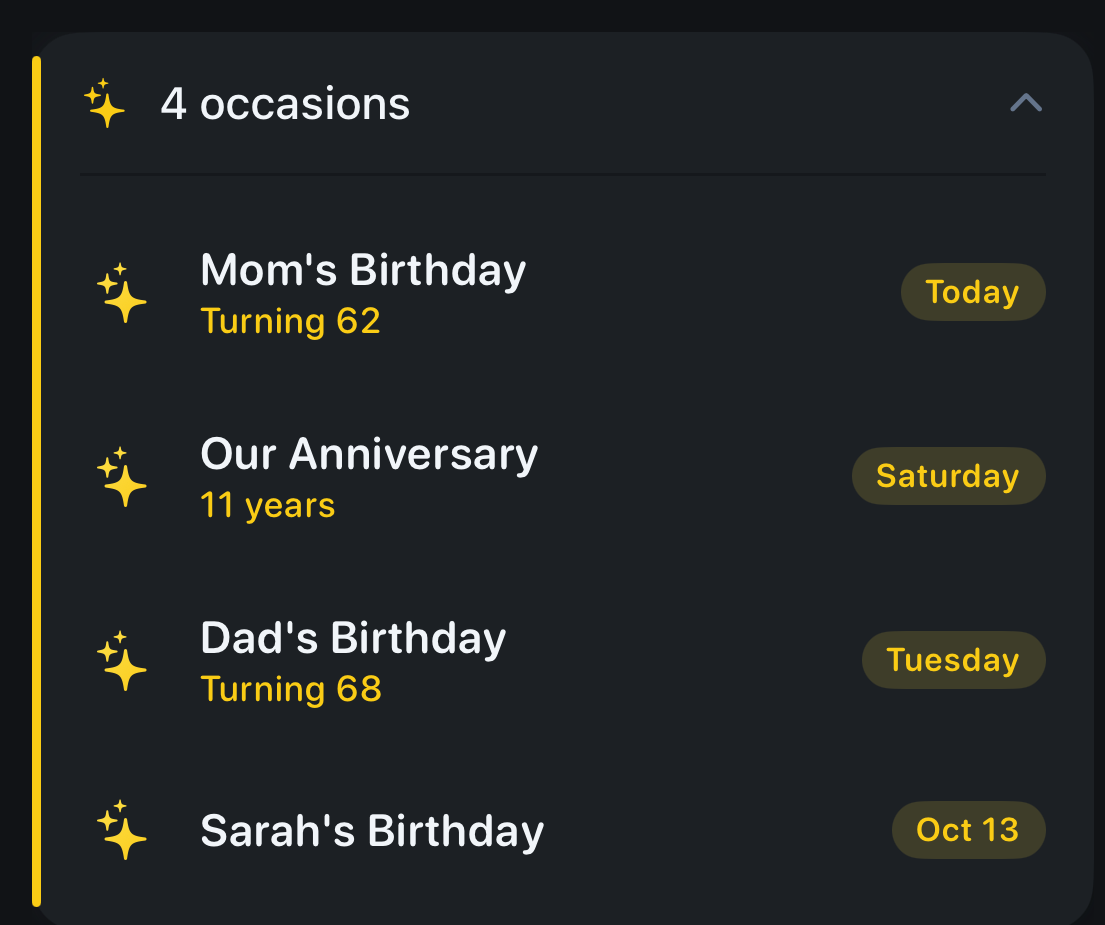
The Occasions card from the current iPhone app, with example entries. On the Today view it stays folded into a single line until you open it.
The exact reminder schedule
Most apps let you pick one reminder. Composed sends a fixed sequence, spaced for how a gift actually gets bought. This is what it sends for “Mom’s birthday”, with the birth year saved:
| When | What the notification says |
|---|---|
| 30 days before, 9 AM | Mom’s birthday in a month. Turning 62. |
| 3 weeks before, 9 AM | Mom’s birthday in 3 weeks — Turning 62. Time to think about a gift. |
| 2 weeks before, 9 AM | Mom’s birthday in 2 weeks. Order a gift so it arrives in time. |
| 1 week before, 9 AM | Mom’s birthday next week. Plan how to celebrate. |
| 3 days before, 9 AM | Mom’s birthday Saturday. Wrap the gift, write the card. |
| The evening before, 7 PM | Mom’s birthday tomorrow — Turning 62. |
| The day, 9 AM | Mom turning 62 today. |
If you add a birthday that is only ten days away, you get the steps that are still ahead: one week, three days, the evening before, and the day. Anniversaries follow the same schedule, with the years married instead of an age.
Where Composed is the wrong pick
- It doesn’t import birthdays from Contacts. If you have forty birthdays on your contact cards, a dedicated app that reads Contacts, or your iPhone’s own Birthdays calendar, will be far less work.
- Each birthday you add counts toward the free plan. Composed is free for 5 active items, and a birthday is one of them. Pro removes the limit for $5.99 a month or $39.99 a year.
- The schedule is the same for everyone. You can turn all birthday reminders off in Settings, but you can’t give your sister three weeks’ notice and a coworker one day. Birthday Reminder & Countdown and hip both let you do that.
- It’s iPhone only.
Where it earns its place is if you already plan your week in one app and want the people you care about in that same app, reminded early enough that “I should get something” turns into something that arrives on time.
What to look for in any birthday app
Notice you can act on. A same-day reminder is enough for a message. A gift that ships needs about two weeks, and a mailed card needs a week or more. Check how early the app can tell you before you add a single birthday.
Control that matches how many people you’re tracking. Five close birthdays need a good schedule. Fifty need a Contacts import and per-person settings.
A reminder you will actually see. If you tend to swipe notifications away, choose an app that asks again, like Due’s Auto Snooze. If you tend to feel nagged, choose one that stays quiet until the date is close.
Where your list lives. Some of these apps work without an account and some sync through the developer or through iCloud. Read the listing’s privacy details before importing your whole address book.
Birthday reminders on iPhone: common questions
Does iPhone have a built-in birthday reminder?
Yes. Birthdays saved on your contacts can appear in the Calendar app's Birthdays calendar, and you choose how early you hear about them in Settings → Apps → Calendar → Default Alert Times → Birthdays. The setting applies to every birthday at once.
Why don't I get birthday notifications on my iPhone?
The usual causes are that the Birthdays calendar is switched off in the Calendar app, or no birthday reminder is chosen in Settings → Apps → Calendar → Default Alert Times → Birthdays. Also check that notifications for Calendar are allowed in Settings → Notifications.
What is the best free birthday reminder app for iPhone?
If your contacts already have birthdays, the free option is the one built into your iPhone. Among separate apps, Cake says on its App Store listing that it is free with no subscriptions and no account. Birthday Reminder & Countdown and hip are free to download and sell optional upgrades.
How far ahead should a birthday reminder be?
It depends on what you plan to do. A message or call needs only a same-day or day-before reminder. A mailed card needs about a week. A gift that ships needs about two weeks. That is why Composed sends reminders from a month out down to the morning of the day.
Can Composed import birthdays from my contacts or Apple's Birthdays calendar?
No. Composed skips Apple's Birthdays calendar when it reads your calendars, and it doesn't read birthdays from Contacts. You add each birthday by saying or typing it, for example "Mom's birthday March 3, 1964". If you want an import, use your iPhone's Birthdays calendar or a dedicated app such as Birthday Reminder & Countdown.
Does Composed remind me about anniversaries too?
Yes. Anniversaries use the same schedule as birthdays, from a month before to the morning of the day. If you give the year, the reminder includes how many years it has been.